Digital Marketing Tools & Website Plugin Configuration is essential aspects of LinkedIn and website design, including creating and styling contact forms using plugins like WP Forms and managing design elements with tools like Elementor. A significant portion of the material outlines the configuration and troubleshooting of various lead generation plugins, such as WhatsApp integration, live chat systems, and specialized chatbots for handling course enrollment and user inquiries. Finally, the team also discussed presentation and logo design elements, emphasizing consistent design practices and the use of tools like Canva for marketing materials.
Diverse website plugins are configured and utilized for effective lead generation primarily through the implementation of contact forms, integrated messaging systems (like WhatsApp and live chat), and automated chatbot functions.
Digital Marketing Tools & Website Plugin Configuration for Contact Form Plugins
Contact forms are critical components on websites utilized to generate leads and facilitate communication
- Installation and Field Selection
- Field Requirements and Conciseness
- Submission and Confirmation
- Styling and Placement
Installation and Field Selection:
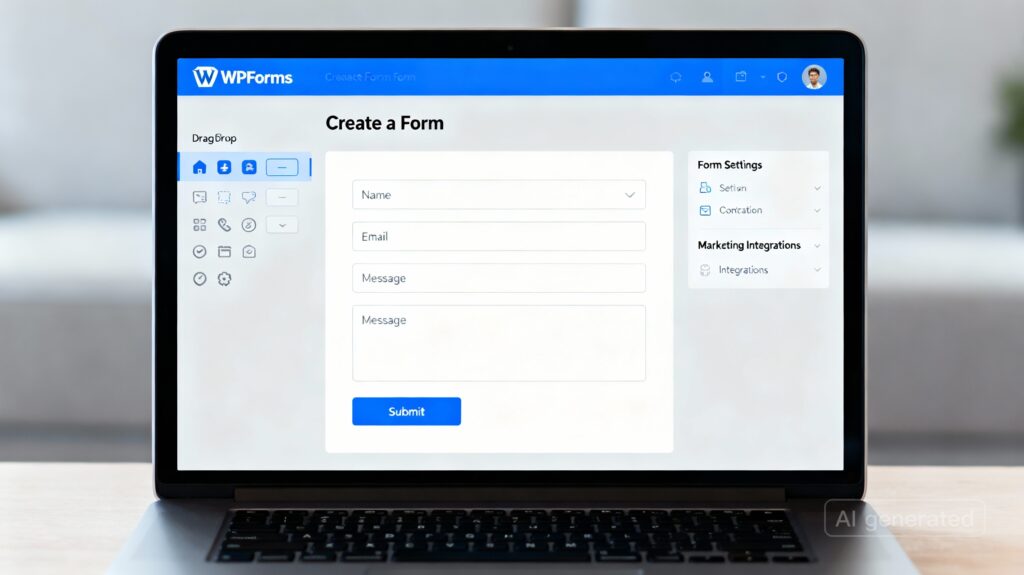
The process includes installing the plugin (such as WP Forms or Contact Form Maker) and selecting the required form fields. Standard fields agreed upon for inclusion often cover the user’s name, email, and phone number, with options for adding additional fields as needed.
Field Requirements and Conciseness:
Configuration includes setting field requirements. It is important to keep the form concise to minimize user frustration.
Submission and Confirmation:
Configuration involves setting up form submissions and enabling email confirmation for users.
Styling and Placement:
The configuration of the contact form in WordPress involves styling elements such as text color, size, and padding. Once customized, the form is published and previewed. It can be added to specific website sections, such as the header.
Live Chat and Chatbot Systems for Website Plugin Configurations
Live chat and chatbot systems are utilized to handle user inquiries and gather information, effectively streamlining lead collection and management.
- System Implementation and Interface Setup
- Configuring Chat Flows
- Integration for Course Enrollment
- Existing Tool Integration
System Implementation and Interface Setup:
Using a plugin like TDO, implementation starts with creating an account, setting up the chat interface, and configuring automated responses.

Configuring Chat Flows:
For new website visitors, the system can be configured to start a specific chat flow, which typically includes a welcome message and a question designed to gather initial information.
Integration for Course Enrollment:
Chatbots can be specifically implemented for tasks like course enrollment. Configuration involves setting up the bot to handle user inquiries, collect contact information, ask about specific interests (e.g., AI-powered courses), and provide materials like course brochures. The system is tested by simulating user interactions to confirm its effectiveness in handling inquiries and directing users.
Existing Tool Integration:
The chat system is also configured to integrate with existing tools.
WhatsApp Integration Plugins
Integrating WhatsApp allows websites to handle user inquiries and course enrollment directly via messaging
- Plugin Options and Settings
- Implementation Status
Plugin Options and Settings:
The team explored installing and configuring two main options: the Click to Chat and Pop Up Box plugins. Configuration involves settings for message templates, button styles, and placement options.
Implementation Status:
While the Click to Chat plugin was successfully set up, challenges were encountered with the Pop Up Box plugin, including technical issues like problems creating a Google account.
Design and Utility Plugins
Other plugins and tools support lead generation indirectly by enhancing the website’s design and user interaction elements.
- Website Design
- Pop-up Configuration
- Specific Plugins for Testing
Website Design:
Plugins like Elementor and Elementor Kit are used in website design.
Pop-up Configuration:
Configuration of pop-ups involves editing templates, adjusting colors and backgrounds, and setting specific display rules, such as implementing exit intents to capture users before they leave the site.
Specific Plugins for Testing:
The team was instructed to install and explore plugins like Display GL and WhatsApp Pop-ups for automation and functionality testing.
Effective utilization of these diverse plugins is similar to setting up a series of specialized fishing nets on a website: each net (contact form, chatbot, or WhatsApp button) is configured with specific baits (fields, automated messages, display rules) to capture different types of user information (leads) as they interact with the site.